How to install metasploit-framework in Windows (7/8/10)
How to install Metasploit in Windows (7/8/10)
If you also want to use metasploit, but you are on a windows machine, then the best thing you can do is to install VirtualBox and Kali Linux in VirtualBox. But as it takes a lot of time and patience, so here's a quick solution for this.

The process is way more simple than you think, you have to go to metasploit.com and download the latest windows installer from there itself.
To use msfconsole directly from CMD, you will have to add metasploit to path,
Type in the search bar, 'view advanced system settings' and press enter.
Click on 'Environment Variables' below.
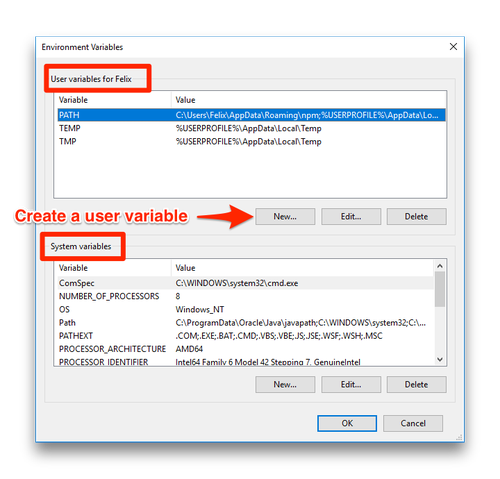
Now, add the path of the bin folder where you have installed metasploit-framework, By default, the path is 'c\metasploit-framework\bin\'.
Hurray!!!!! You have successfully installed Metasploit-framework in your windows computer.
If you have followed all the steps above, there should be any error, but if you faced any errors in installation, kindly drop in comments, I'll try to response as soon as possible.


Comments
Post a Comment